Puanto: A Versatile Serif Font for Elegant Design
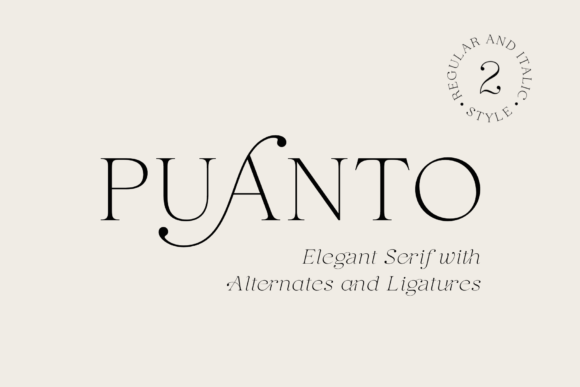
Puanto is a sophisticated serif font that offers two distinct styles: regular and true italic. Its elegant design makes it ideal for a wide range of applications, from logos and branding to wedding invitations, business cards, packaging, and more. With its lightweight appearance and high readability, Puanto is a go-to choice for designers looking to add a touch of class to their projects.
One of the standout features of Puanto is its inclusion of alternates and ligatures for both uppercase and lowercase letters. These elements allow designers to create unique and refined typography that stands out. The italic style adds an extra layer of dynamism, making it perfect for headings, titles, and other prominent text elements.
Designed with usability in mind, Puanto supports OpenType features, which means it can be easily integrated into most design software. Whether you're working on a digital project or a print layout, this font is straightforward to use and enhances the overall aesthetic of your work.
Common Mistakes When Using Puanto
Despite its many advantages, some users may make mistakes when choosing or applying Puanto. One common error is not fully understanding the difference between the regular and italic styles. While the regular style is great for body text and headings, the italic version is best used sparingly to add visual interest without overwhelming the design.
Another mistake is overlooking the importance of alternates and ligatures. These features can significantly enhance the look of your typography, but they require proper setup in your design software. If not enabled, you may miss out on the full potential of Puanto's elegant details.
Some users also fail to consider the context in which they're using the font. While Puanto is highly readable, it may not be the best choice for long blocks of text. Its decorative elements are better suited for short phrases, headlines, or key messages where visual appeal is a priority.
How Mistakes Can Affect Your Work
Choosing the wrong style or neglecting to use alternates and ligatures can lead to a less polished final product. For example, using the italic style for large sections of text might reduce readability and make your design feel cluttered. Similarly, ignoring the font's unique features could result in a generic look that fails to stand out.
Incorrect application of Puanto can also impact the efficiency of your workflow. If you're not familiar with how to access OpenType features, you may spend unnecessary time adjusting text manually instead of leveraging the font's built-in capabilities. This can slow down your design process and increase the risk of errors.
Additionally, failing to check compatibility with your design software can cause issues. Not all programs support OpenType features equally, so it's important to verify that your tools can take full advantage of what Puanto has to offer.
Practical Tips for Better Results
To get the most out of Puanto, start by experimenting with both the regular and italic styles. Use the regular style for body text and the italic for accents or highlights. This balance ensures clarity while maintaining visual interest.
Take the time to explore the alternates and ligatures available in Puanto. These features can add a level of sophistication that sets your design apart. Most design software, such as Adobe Illustrator or InDesign, allows you to access these options through the character panel or glyph menu.
Before finalizing your design, test Puanto in different sizes and contexts. What looks great at 36 points may not work as well at 12 points. Always consider how the font will appear in both digital and print formats to ensure consistent quality.
What to Check Before Using Puanto
Before downloading or purchasing Puanto, verify that it's compatible with your design software. Most professional fonts support OpenType, but it's always good to double-check. You should also review the licensing terms to ensure you're allowed to use the font for your intended purpose, whether it's personal, commercial, or educational.
Consider the availability of different weights and styles. Some fonts come in multiple variations, which can be useful for creating hierarchy in your designs. If Puanto only includes regular and italic, plan your layout accordingly to maintain visual balance.
Finally, read reviews or seek feedback from other designers who have used Puanto. Their experiences can provide valuable insights into how the font performs in real-world scenarios and help you avoid potential pitfalls.
Realistic Examples of Effective Use
A small business owner looking to create a logo might choose Puanto's regular style for the main text, pairing it with a sans-serif font for a modern contrast. The italic style could then be used for a tagline or subtitle to add a touch of elegance.
For a wedding invitation, Puanto's italic style could be used for the couple's names, while the regular style handles the event details. This approach creates a sense of sophistication without sacrificing readability.
In a packaging design, Puanto's alternates and ligatures could be used to create a custom look for the brand name. This attention to detail can elevate the perceived value of the product and make it more memorable to consumers.
Conclusion: Make the Most of Puanto
Puanto is a versatile and elegant font that can enhance a wide range of design projects. By understanding its features and using it wisely, you can create visually appealing and professional-looking work. Avoid common mistakes by experimenting with styles, utilizing alternates and ligatures, and testing the font in different contexts.
With careful planning and attention to detail, Puanto can become a valuable tool in your design arsenal. Whether you're a beginner or an experienced designer, this font offers the flexibility and refinement needed to bring your creative vision to life.